Document intake map
Define document sources, file types, naming patterns, owners, upload paths, email inboxes, portals, and the system of record.
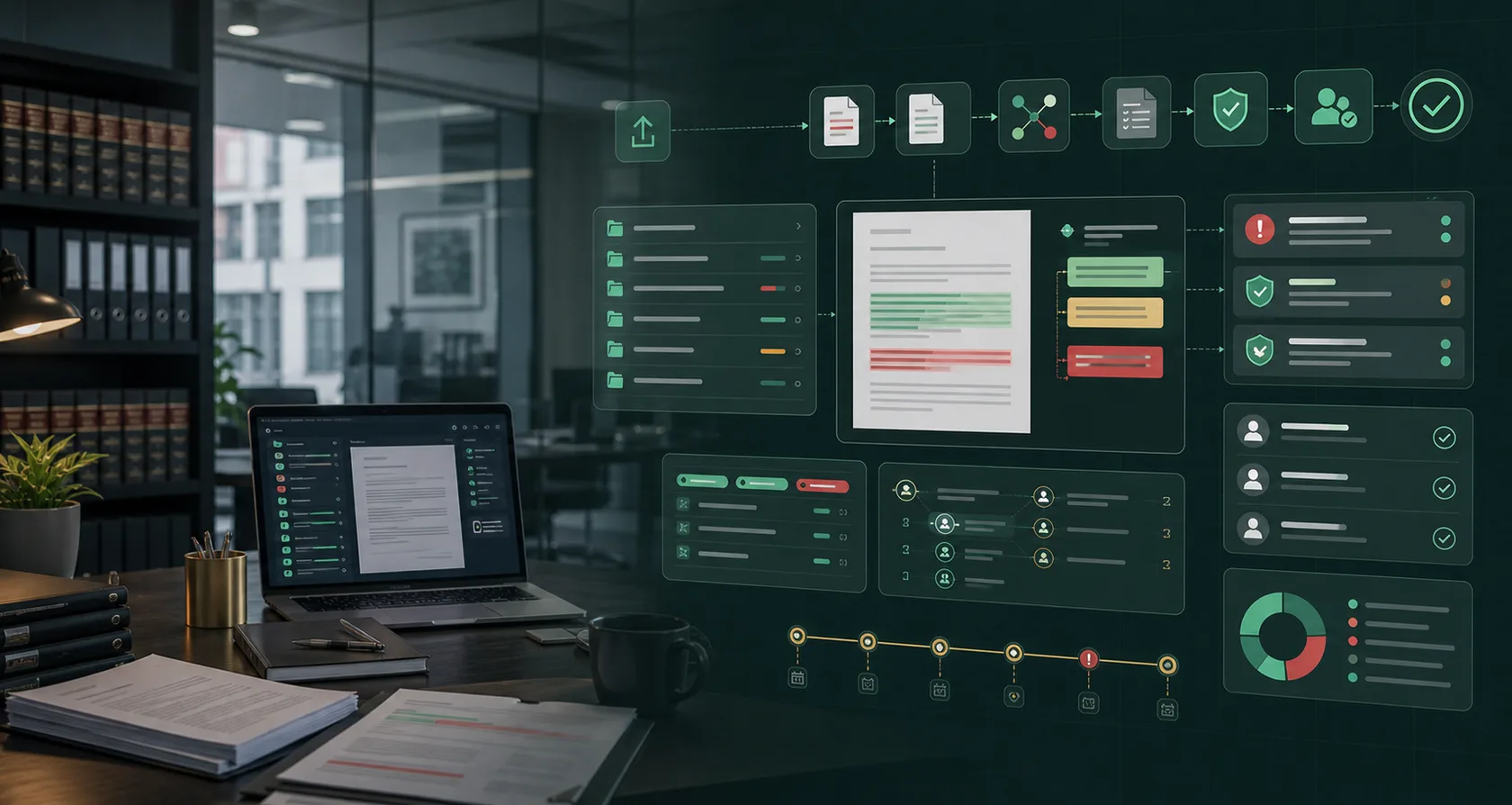
AI automation service
AI document processing automation services for intake, classification, extraction, validation, review queues, system updates, audit logs, and ROI reporting.
Buyer intent
Document-heavy workflows slow down when forms, PDFs, emails, attachments, scans, contracts, invoices, records, and client files need manual sorting, extraction, validation, routing, and data entry. The risk is trusting extraction without source evidence, review queues, and fallback handling.
Deliverables
Every engagement is scoped around concrete work products, clear owners, and decisions your team can review.
Define document sources, file types, naming patterns, owners, upload paths, email inboxes, portals, and the system of record.
Design field extraction, source highlighting, confidence thresholds, duplicate checks, required-field rules, and reviewer correction loops.
Route missing data, low confidence, policy conflicts, sensitive records, and permanent updates to the right human reviewer.
Prepare CRM, ERP, case system, billing, folder, task, or spreadsheet updates with approval logs, fallback paths, and ROI tracking.
Implementation path
Each service starts with the workflow, then narrows into data, approvals, implementation, and measurement.
Choose one document queue: Start with one repeated queue such as client intake packets, invoices, contracts, medical records, applications, claims, or compliance files.
Build the evidence layer: Connect documents to extracted fields, source snippets, confidence signals, reviewer notes, and system-of-record requirements.
Test messy examples: Use scanned files, missing pages, duplicate attachments, mismatched names, handwritten notes, conflicting fields, and edge cases before launch.
Launch and measure: Track document volume, manual minutes removed, correction rate, turnaround time, exception volume, reviewer load, and downstream update quality.
Buyer checks
High-intent buyers should be able to compare scope, pricing, guardrails, and risk language before booking or approving implementation.
Before buying AI document processing automation services, confirm the exact workflow, owner, source systems, sample records, manual volume, and approval risk.
Separate consultation, audit, implementation, integrations, software, managed support, and change-request cost before comparing proposals.
Require allowed actions, blocked actions, approval-required decisions, source evidence, fallback paths, and audit logs before production launch.
Compare the proposal language against public AI risk, security, and implementation references without treating them as a substitute for expert review.
Fit and proof
Use these signals to decide whether a workflow has enough value, repeatability, and control points to automate.
The business repeatedly receives similar documents and spends staff time sorting, extracting, validating, routing, and entering the same information.
The document set is rare, unowned, too inconsistent to define fields, or cannot be reviewed by a responsible owner after extraction.
Reviewers see source evidence, exceptions are visible, corrected fields improve the workflow, and downstream updates are faster and cleaner.
FAQ
Short answers for buyers comparing AI automation options, risk, and implementation scope.
AI document processing automation services help businesses classify documents, extract fields, validate source evidence, route exceptions, prepare system updates, and measure ROI with human review controls.
Common document workflows include invoices, intake packets, applications, contracts, medical records, claims, client files, purchase orders, proof-of-delivery files, and compliance records.
Use source evidence, confidence thresholds, required-field checks, duplicate detection, review queues, blocked actions, fallback paths, and audit logs before updating systems.
Measure document volume, manual minutes removed, turnaround time, correction rate, exception volume, downstream errors, reviewer workload, and the cost of implementation and support.
Decision support
Buyers can compare how the work is planned, priced, governed, and started before booking a consultation.
Workflow guides
Matched workflow pages help buyers see where this service turns into practical implementation.
Build AI document processing workflow automation for document intake, classification, extraction, validation, review queues, system updates, and audit logs.
LegalLegal Document Review AI Workflow AutomationBuild legal document review AI workflow automation for document intake, clause extraction, risk flags, source links, redline queues, attorney approval, and audit logs.
Accounting FirmsAccounting Client Document Collection AI Workflow AutomationBuild accounting client document collection AI workflow automation for missing items, portal reminders, bookkeeping packet prep, staff approval, and ROI reporting.
Mortgage BrokersMortgage Borrower Document Collection AI Workflow AutomationBuild mortgage borrower document collection AI workflow automation for pay stubs, bank statements, tax forms, IDs, conditions, disclosure status, loan officer approval, and ROI reporting.
Start scoped
The strongest first step is a narrow workflow with clear owners, accessible data, approval rules, and a measurable ROI baseline.